Thursday, September 17, 2009

How to Download Youtube video to Your Nokia?

I am going to write this, how to download youtube videos to Nokia. And I think this will also help people who want download youtube to iPod, iPhone, PSP, PC, etc. Here I want to show two steps. First, download youtube video to your computer. Second, convert your video to the right format for Nokia, I' ll use 3GP. Here we go.

Download Youtube Video to Computer.
1, You need a youtube downloader of course. Like Leawo Free Youtube Downloader.
2, Open Leawo YouTube Download, type the website address in the address bar.

3, Choose a video for playing, and click “Download” button on the pop-up window which at the right bottom corner of the screen.
http://www.leawo.com/images/tutorial-win/youtube-download/tutorial2.jpg
4, You can get the video you want in a few minutes. You can find the downloaded video in the “Downloaded” folder. Double click the downloaded video, you could play it with the built-in player.


PS: You can find the video files in this folder "My Documents\Leawo\Youtube Downloader".


Convert the video downloaded to 3GP format for Nokia.
As we know, the Youtube videos are all in FLV format. So we need to convert FLV video to 3GP format now.
1, Download a FLV converter which can convert FLV videos to 3GP. You can use Leawo Free FLV Converter, if you are using MAC OS, you can use Leawo Free MAC Video Converter or Leawo MAC FLV Converter.
2, Click “Add” to add video file to the program.

2, Do some easy setting. Click drop-down button next to “Style” on the main interface to specify a format as your output format: 3GP, 3G2, or audio file.
3, After completing settings, click “Convert button” to start video to 3GP, 3G2, or audio file conversion. You' ll get a 3GP video when the conversion process finished.
4, Now you can save the video in your Nokia now, and you can take it with you.

Ok, all the steps to download youtube videos to Nokia are here now. But you' d better try it yourself. Any problems, please feel free to contact me.

Convert Videos and Reduce Video Size for Nokia
How to Edit The Audio in Video File?
The Best Resolution and Bitrate For iPod
How to watermark a video on MAC?

Tuesday, August 25, 2009

How to Upload MSWMM Video to Youtube?

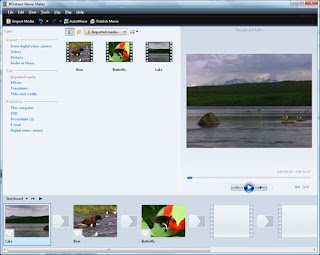
I think you must have met this problem, or why you are looking for how to upload MSWMM video to Youtube. Here I' ll show you how to change MSWMM file to WMV video and how to upload it to Youtube. You don't need any MSWMM converter, the tool we need is just Windows Movie Maker. You can find WMM in the folder "Windows"-"Movie Maker" easily.

MSWMM file is a project file of Windows Movie Maker. If you clicked "File"-"Save" when you finished the project, all of your work would be saved as a MSWMM file. But MSWMM file is not a video file, so you can only check it in WMM. And Youtube can not support it of course.

So if we want to upload a MSWMM to Youtube, we need to change the MSWMM file to video at first, then it will be very easy to upload a video file to youtube.

Part 1, Change MSWMM file to WMV video.
mswmm to youtube, mswmm converter, windows movie maker Open the MSWMM file with Windows Movie Maker now. You can double click on the file or just drag-drop it into the WMM. Then find "Publish to"- "This Computer". Follow the prompts, you can easily save your project as a WMV format video.

Part 2, Upload the video to Youtube.
Youtube can support QuickTime .MOV, Windows .AVI, or .MPG files and WMV video formats. As you have got a WMV video, you can upload the video to Youtube now. But if your want to reduce your video size, you can try to convert the WMV video to MP4. A smaller video size will make the upload prcess shorter. And MP4 is the best choice. You can use Leawo Free MP4 Converter to convert the video. And here you can find a step by step guide about convert video to MP4.
Now here is the page to upload video to Youtube. Wish you enjoy it. Btw, you'll need a Youtube account or Gmail account first.

That's all about upload MSWMM video to Youtube. So stop finding MSWMM converter, there is no other converter can do this as I know. Now only two steps, you can put the MSWMM file to Youtube. Any feedback is welcome, Please leave your comments.


How to Make HD Video for Youtube?
Convert Videos and Reduce Video Size for Nokia
How to Edit The Audio in Video File?
Batch Convert Videos To iPod

Monday, August 24, 2009

How to Make HD Video for Youtube?

I think you must have noticed, some of the Youtube video have a little "HD" button on the left bottom. It means you can also watch the video in HD mode. So how can you make a HD video for your Youtube channel? How can we make our video quality as high as we can.

1. First of all, make your original video quality as high as possible. If you shoot the video with your camera, you'd better choose HD devices. If you are editting videos downloaded online, you should try to find the best quality video material.

2. Edit your video with your original material. Because the video will loss quality everytime you recode it.

3. If your video edit software can't recognize your original video format, you can try to convert the videos to AVI format. AVI is the most popular format, it can be supported by most of the video edit software. (But not for MAC.) And AVI format is the most complete video format which can keep your video quality. If you are use Leawo Video Converter, you can chose "Lossless Uncompressed AVI" as the output format.

4. Though Youtube can accept most of popular video format, like AVI, MP4, MPEG, MOV etc. Keep your video in a reasonable size is very important. So when you finished the video, you may need to convert your video again. To reduce your video size or change your video format.
You can control the output quality when you convert videos with Leawo Video Converter. And diferent video format result in different video size.

5. For me I always use MPG as the output format for short videos, and MP4 for long ones. Youtube machine will separate HD video with No-HD video according the rate of video size and video longth. So if your video is not so high definition, you can also try to make your video size bigger, so that's why I choose MPG for short videos.

Convert Videos and Reduce Video Size for Nokia
How to Edit The Audio in Video File?
The Best Resolution and Bitrate For iPod
How to watermark a video on MAC?